


Diesel Repair
3.910.00 Reviews
App Specs
- Version
- 1.1.2
- Updated On
- License
- Free
- Downloads
- 10,000+
- Developer
- Diesel Laptops
- Categories
- Auto & Vehicles
- Platform
- Android
Screenshots
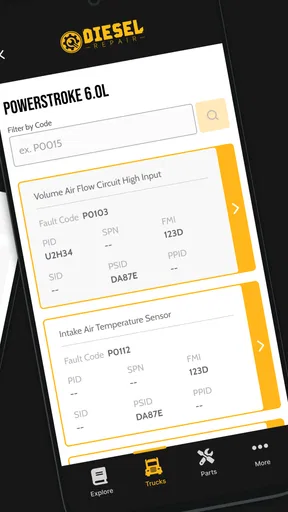
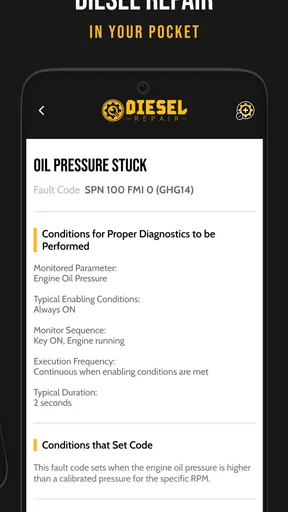
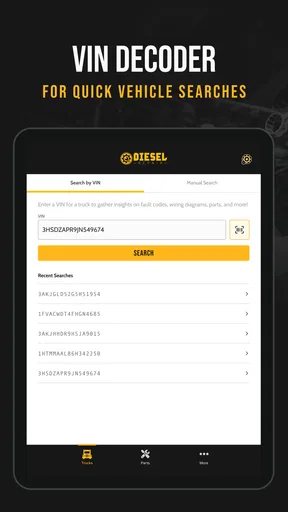
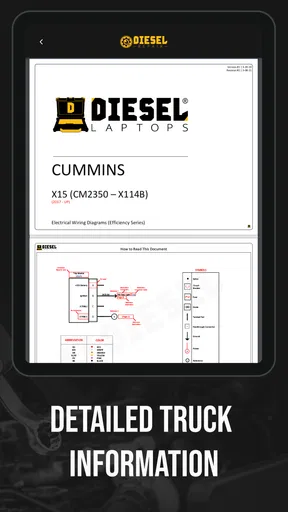
 Analysis by AppCompare
When a heavy-duty truck problem appears far from a workshop, the hardest part is often not turning a wrench; it is deciding what to check first. Diesel Repair is built for that moment. It is a free Auto & Vehicles app from Diesel Laptops that puts diesel repair information into a phone-friendly format, with optional purchases ranging from $9.99 to $249.99 per item. I see it as a practical reference for people who already spend time around commercial trucks and want a more focused starting point than a general web search.
My first impression is that this is not an app aimed at casual car owners. Its subject is heavy-duty diesel repair, so its value depends on whether the vehicle, engine, and problem in front of you fit that world. For a fleet technician, independent mechanic, owner-operator, or vocational student, that focus can save time. For someone looking for oil-change reminders, fuel prices, roadside assistance, or ordinary passenger-car maintenance, it is the wrong kind of tool.
What to expect before you begin
The app carries a 3.9 average from 46 ratings, with 10 reviews and over 10K installs. Those numbers suggest a small but real user base rather than a mature, universally established workshop platform. I would approach it as a specialized repair companion that deserves a trial on your own equipment, not as a replacement for manufacturer documentation, a scan tool, or hands-on training.
Diesel Laptops is the developer, and the app is listed as free with an Everyone content rating. It was released on November 26, 2024, and the current version is 1.1.2. It runs on Android 7.0 or later, which makes it accessible on many older work phones and shop devices. That compatibility is useful in practice: a technician does not necessarily need a new personal phone to test it.
The most important expectation to set is that an app like this helps organize troubleshooting; it does not physically diagnose a truck. You still need the vehicle identification, the symptoms, safe access to the engine or chassis, and the correct tools. If the issue involves an active safety risk, a warning that requires immediate attention, or a repair beyond your training, the sensible next step is professional service rather than experimenting from a phone screen.
I also would not judge the app only by how quickly it opens or how attractive its first screen looks. A repair reference earns its place when it helps me move from a vague complaint to a sensible inspection sequence. The useful test is whether I can arrive at a repair decision with less random searching and fewer unnecessary parts removed.
Installing it without overcommitting
Because the initial download is free, the easiest approach is to install it before you are standing beside a disabled truck. Open it on a reliable connection, look through the available sections, and decide whether its coverage matches the engines and systems you actually encounter. I would not buy an optional item immediately just because a problem feels urgent. First identify the type of information you need and whether the app’s organization suits your workflow.
Worth Reading Before You Choose

EA SPORTS FC Mobile 26 Is a Bigger Football Game, but It Takes Time

Flipboard Shows What News Apps Must Do Beyond the Feed

Switching to Android Auto Means Rethinking Your Driving Routine

Google Calendar Makes a Crowded Week Easier to Manage

Ludo King Makes the Most of the Minutes Between Plans

Baby Panda World Brings Quick Play to Modern Phones, but Its Game Library Feels Busy
The in-app purchase range is wide, from $9.99 to $249.99 per item. That matters more for a professional than the free download itself. A casual user may only need occasional reference material, while a shop could justify a larger purchase if it supports repeated work. Before spending, I would compare the likely cost with the number of repairs where the material could genuinely save diagnostic time.
Keep the first session simple. Use a phone that is easy to handle with dirty hands, avoid balancing it on a moving vehicle, and record the truck’s identifying details somewhere separate from the app. That small habit prevents a common mistake: opening a repair reference without knowing the exact engine family, system, or symptom pattern you are trying to match.
Getting from installation to a meaningful first result
Before I expect a repair reference to help, I like to arrive with a clear description of the problem and the truck in front of me safely parked. In this section, I’ll focus on how to turn an initial installation into a useful first check, rather than simply browsing topics; that preparation also makes it easier to judge whether the app fits your routine.
Start with the complaint, not the part
For a first test, I recommend choosing a real but non-urgent issue rather than waiting for a breakdown. Write down what the driver noticed, when it happens, and what changed recently. “Low power” is too broad to be useful on its own. A better note might distinguish between low power under load, rough running at idle, a starting problem, unusual smoke, or a warning that appears only after the truck warms up.
That preparation gives the app a fair test. Instead of tapping through repair topics at random, you can use it to narrow the path from symptom to inspection. The first successful action is not necessarily replacing something. It may be finding a relevant procedure, identifying the checks that should come before parts replacement, or realizing that the complaint points toward a system you had not considered.
This is one of the strongest ways to use a specialized reference: treat it as a decision aid. If the truck has a recurring fault, compare the app’s suggested direction with your own observations. If the two disagree, do not force the repair to fit the screen. Recheck the vehicle information and the symptom description before going further.
A realistic roadside workflow
Imagine an owner-operator notices reduced pulling power while climbing a grade. The truck still moves, but the change is obvious. I would first park safely, note any warning indicators, and make a quick record of whether the issue appeared suddenly or gradually. Then I would open Diesel Repair, select the closest heavy-duty repair topic, and use the information to create an inspection order rather than immediately buying a component.
The practical benefit is the order of operations. A technician can begin with visible connections, obvious damage, fluid or air-related clues, and the conditions under which the symptom occurs. If the reference points toward a test that requires equipment, the app has still helped by showing where a professional diagnostic session should begin. That is more useful than searching several unrelated forum posts while the truck is exposed to traffic and weather.
I would also take notes outside the app as I work. Record what was checked, what was found, and what changed after each step. This makes the phone a reference instead of the entire repair record. It also helps when the problem returns or when another technician takes over the job.
Where the app can save time
Its focused subject is the main advantage. General search results mix heavy-duty procedures with passenger-car advice, old forum discussions, and pages written for different engine families. A dedicated diesel repair app can reduce that noise and make it easier to stay within the vocabulary of commercial truck systems.
Another useful trade-off is portability. Printed manuals are valuable, but they are not always convenient beside a truck. A phone can remain with the technician while moving between the cab, engine bay, and parts counter. The downside is equally clear: a small screen is less comfortable for long reading, and a phone is vulnerable to dust, grease, impact, and poor connectivity. I would use it for targeted checks, not as my only workshop reference.
The app can also help newer technicians learn how experienced people structure a diagnosis. The key lesson is not memorizing a list of parts. It is learning to connect a complaint with conditions, evidence, and a sequence of checks. That makes it more valuable for guided learning than for blind trial-and-error repairs.
Common confusion during the first session
The first source of confusion is the difference between a repair reference and a complete diagnostic platform. An app can explain a procedure or point you toward a system, but it does not replace a compatible scan tool, a multimeter, pressure-testing equipment, service literature, or the judgment to interpret a result. If you expect one installation to identify every fault automatically, you will probably be disappointed.
The second issue is coverage. “Diesel repair” sounds broad, but heavy-duty trucks use many engine, transmission, emissions, electrical, and chassis combinations. Before relying on a procedure, confirm that it applies to the vehicle in front of you. A familiar symptom can have different causes across models, and a repair step that is correct for one configuration may be inappropriate for another.
A third point concerns the optional purchases. The free entry point does not mean every useful resource is included without charge. Since individual purchases can reach $249.99, I would treat each one as a work-related decision. If you maintain one truck occasionally, a purchase may be difficult to justify. If you service similar vehicles regularly, the calculation changes because repeated use can make a specialized reference more worthwhile.
There is also a human-factor problem: reading while distracted beside a running vehicle. I would review the next step with the truck safely parked, then put the phone away before testing anything that involves moving components, hot surfaces, pressurized systems, or electrical hazards. The app may improve the information side of a repair, but it cannot make an unsafe work area safe.
How it compares with the usual alternatives
The usual alternatives fall into three groups: manufacturer service information, general web searches, and professional diagnostic software. Manufacturer material is usually the better choice when you need exact specifications, vehicle-specific procedures, wiring details, or official service instructions. It can be harder to navigate, but precision matters more than convenience when a repair has serious consequences.
General web searches are faster for broad questions and often useful for symptoms that are not specific to one truck. Their weakness is uneven quality. You may spend time sorting through advice for unrelated engines, outdated procedures, or confident guesses that lack a proper test sequence. Diesel Repair is more appealing when you want a narrower, heavy-duty-focused starting point rather than a large pile of mixed results.
Professional diagnostic platforms are the stronger option for shops that need live data, fault-code workflows, testing functions, and deeper integration with equipment. They also tend to demand more training and a larger investment. I would choose Diesel Repair alongside such tools, not instead of them, when the app helps explain or organize the repair while the diagnostic platform supplies measurements.
For a student or new technician, the best combination may be the app plus supervised practice and reliable vehicle documentation. For an experienced mechanic, its value depends on whether it shortens the search for a procedure you do not use every day. For a driver who rarely performs repairs, a trusted shop and roadside plan may be more sensible than paying for specialized reference material.
Small habits that make the reference more useful
One non-obvious improvement is to separate diagnosis from confirmation. Use the app to decide what evidence you need, then confirm the result with an appropriate measurement or inspection. Do not treat a matching symptom as proof that a component has failed. This approach reduces parts swapping, which is especially important on expensive heavy-duty systems.
Another is to build a personal list of recurring truck problems outside the app. If the same warning or performance complaint appears repeatedly, note the conditions, previous repairs, and successful checks. The app then becomes part of a repeatable workflow rather than a tool you open only when frustrated. Over time, your notes can reveal patterns that a single session cannot.
A third is to use the phone for handoff communication. When a repair cannot be finished roadside, write down the symptom, the checks already completed, and the next recommended direction. That gives the shop a cleaner starting point and prevents duplicated work. The app does not need to be the place where every note is stored to make the process better.
These habits also show the app’s limits honestly. It can improve preparation, reduce searching, and support a more orderly inspection. It cannot guarantee that a difficult intermittent fault will be solved on the first attempt, and it cannot replace the experience needed to recognize when a result does not make sense.
Who should use it and who should skip it
I would recommend trying it if you work with heavy-duty diesel trucks, want a portable repair reference, and are comfortable checking vehicle details before following a procedure. It is particularly promising for owner-operators who want better structure during minor troubleshooting, small fleets that need a shared starting point, and technicians who occasionally encounter systems outside their daily routine.
I would be more cautious if you need complete manufacturer-level coverage, live diagnostic data, or a guaranteed answer for a specific truck configuration. In those situations, official service information or a professional diagnostic platform is the better primary resource. I would also skip it if your needs are limited to ordinary passenger vehicles, since its heavy-duty focus would add complexity without much benefit.
The purchase model is another dividing line. A free installation makes testing easy, but professional use may lead to paid material. Decide based on actual repair frequency, not on the excitement of having a new reference. If the app helps you avoid one unnecessary diagnostic detour, it may earn its place; if you open it only once or twice a year, the value is less obvious.
My next-step recommendation
After installation, I would spend one short session exploring the repair areas, then choose a familiar truck issue and write down the symptoms before searching. Use the app to form an inspection sequence, verify the vehicle details, and stop whenever the next step requires equipment or expertise you do not have. That gives you a meaningful test without turning the first experience into a risky repair.
For regular users, the next step is to decide whether the free material is enough for the work you actually do. Only then should you consider an in-app purchase. Keep the receipt and the scope of what you bought in your work records, especially if the app becomes part of a shop’s routine.
My overall view is positive but measured. Diesel Repair is a focused Android tool from Diesel Laptops that can make heavy-duty troubleshooting more organized and portable. Its strongest role is between the initial complaint and the final confirmation: it helps me ask better questions and choose a more sensible starting point. I would recommend it to the right diesel-truck user, while keeping official documentation, proper tools, and professional judgment in the workflow. Use it as a repair companion, not as permission to guess.
Pros
- Useful diesel troubleshooting references for mechanics and vehicle owners.
- Covers common engine systems
- making it suitable for basic repair research.
- Can help identify likely causes before visiting a professional workshop.
- Practical information may reduce unnecessary diagnostic time.
- Convenient mobile access to repair guidance while working on a vehicle.
Cons
- Information may not cover every diesel engine make or model.
- Some repairs still require professional tools and hands-on experience.
- Instructions may be too general for complex mechanical problems.
- Incorrect repairs can cause costly damage or create safety risks.
- Content quality and update frequency may vary between app sections.
FAQs for Diesel Repair
What is Diesel Repair, and who is it designed for?
Diesel Repair is a mobile reference tool aimed at people who work with or maintain diesel-powered vehicles and equipment. It may be useful for professional mechanics, workshop technicians, fleet operators, students, and experienced owners who need repair information while away from a computer. Before downloading, check the app description and screenshots to confirm that its coverage matches your engine type, vehicle brand, and level of technical experience.
What kind of repair information does Diesel Repair provide?
The app is intended to help users locate practical diesel-service information, which can include troubleshooting guidance, component details, maintenance references, repair procedures, specifications, or diagnostic material. The exact content can vary depending on the version and platform. It should be treated as a reference aid rather than a complete replacement for official service manuals, manufacturer bulletins, or professional diagnostic equipment.
Can beginners safely use Diesel Repair for vehicle repairs?
Beginners may use Diesel Repair to understand diesel systems, identify possible causes of a problem, and prepare questions for a qualified mechanic. However, diesel engines involve high pressure fuel systems, hot components, moving parts, electrical hazards, and heavy equipment. Users should not rely on an app alone for critical repairs. Always follow the vehicle manufacturer’s safety instructions and seek professional help when unsure.
Does Diesel Repair work without an internet connection?
Offline availability depends on the specific version of Diesel Repair and how its content is delivered. Some applications store reference material directly on the device, while others require an internet connection for searches, updates, images, or database access. After installation, test the main features in airplane mode before relying on the app in a workshop, garage, or remote location with limited connectivity.
Is Diesel Repair free to download, and are there any additional costs?
The download price and available features can differ between Android and iOS, as well as between app versions. Some content may be free, while advanced references, subscriptions, advertising removal, or in-app purchases may require payment. Review the store listing carefully before installing, including recurring subscription terms, supported devices, privacy information, and refund conditions, so there are no unexpected costs.


